
Collecting data from websites used to mean writing scripts, dealing with broken selectors, and spending hours debugging. A modern web scraping tool changes all of that — letting anyone pull data from the web without touching a line of code.
Why You Might Need a Web Scraping Tool
Every day, people spend hours copying and pasting information from websites. Price lists, contact details, product catalogs, job postings — the data is right there on the screen, but getting it into a spreadsheet feels like a chore.
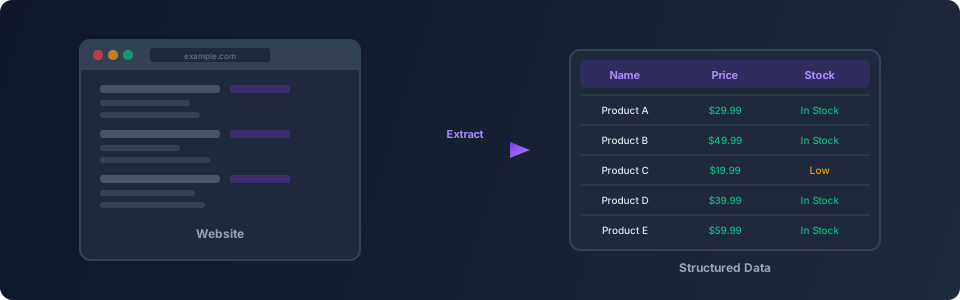
A web scraping tool automates this process. Instead of manually visiting pages and copying text, the tool visits the pages for you, reads the content, and organizes it into a format you can actually use.
Here are some common situations where web scraping saves time:
- Price monitoring — Track product prices across multiple online stores
- Lead generation — Collect business contact information from directories
- Research — Gather data from public records, news sites, or academic sources
- Inventory tracking — Monitor stock levels on supplier websites
- Job hunting — Pull job listings from multiple career sites into one place
How Web Scraping Works (In Plain English)
Think of a web scraping tool as a very fast assistant who can browse the internet for you. You tell it which websites to visit, what information to look for, and where to save it. The tool then:
- Opens the website in a browser (just like you would)
- Finds the specific information you asked for
- Copies that information
- Saves it in a structured format like a spreadsheet or CSV file
- Moves on to the next page and repeats
The key difference from old-school scraping scripts is that modern tools use a real browser. This means they can handle websites that load content dynamically, require scrolling, or use interactive elements — things that trip up basic scraping approaches.
Getting Started with Web Scraping in Flyto2
Flyto2 makes web scraping accessible to everyone. You do not need to install libraries, write Python scripts, or understand HTML selectors. The platform includes browser automation modules that handle the technical details for you.
Step 1: Describe What You Want
With Flyto2's AI agent, you can describe your scraping task in plain language. For example:
"Go to example-store.com, find all product names and prices on the first three pages, and save them to a CSV file."
The agent turns your description into a workflow — a series of steps that the browser follows automatically.
Step 2: Let the Browser Do the Work
Flyto2 opens a real browser session. It navigates to the target website, identifies the data you want, and extracts it. Because it uses a real browser, it handles:
- Pages that load content as you scroll
- Buttons you need to click to reveal more data
- Multiple pages of results (pagination)
- Pop-ups and cookie banners that get in the way
Step 3: Get Your Data
Once the scraping is complete, your data is organized and ready to use. You can export it as a CSV, JSON, or feed it directly into another workflow.
Practical Examples
Example 1: Collecting Product Information
Imagine you run a small online shop and want to compare your prices with other stores. Instead of checking each store manually every week, you set up a scraping workflow:
- Visit three store websites
- Find all products in a specific category
- Extract the product name, price, and availability
- Save everything to a spreadsheet
What used to take two hours now takes two minutes.
Example 2: Gathering Research Data
A market researcher needs to collect company information from a business directory. The directory has thousands of listings spread across hundreds of pages. Doing this by hand would take days.
With a web scraping tool, the researcher describes the target data — company name, industry, location, website — and lets the tool visit every page automatically. The result is a clean dataset ready for analysis.
Example 3: Monitoring Changes
Some websites update their content frequently — news sites, government portals, stock listings. You can set up a scraping workflow that runs on a schedule, collects the latest data, and alerts you when something changes.
Tips for Better Web Scraping
- Start small — Test your scraping workflow on a single page before running it across an entire website
- Be respectful — Add reasonable delays between requests so you do not overload the website
- Check the terms — Some websites have rules about automated access, so review their terms of service
- Validate your data — Spot-check the results to make sure the tool is capturing the right information
- Use screenshots — Flyto2 takes evidence snapshots at every step, so you can verify exactly what the browser saw
Why Flyto2 Is Different
Most web scraping tools require you to learn selectors, write configuration files, or deal with proxy rotation. Flyto2 takes a different approach:
- Plain language instructions — Describe what you want in everyday words
- Real browser sessions — No fake requests that get blocked
- Built-in error handling — The tool adapts when pages look different than expected
- Evidence trail — Every action is logged with screenshots, so you know exactly what happened
- 400+ modules — Scraping is just one thing Flyto2 can do. You can connect it to file operations, data transformation, notifications, and more
Try Flyto2
Ready to stop copying and pasting? Get started with Flyto2 and see how easy a web scraping tool can be.
- Visit flyto2.com to learn more
- Read the documentation for detailed guides
- Explore the open-source engine on GitHub