
n8n is a solid workflow automation tool. It connects APIs, moves data between apps, and lets you build flows with a visual editor. But what happens when the task you need to automate does not have an API?
That is the moment many teams start searching for an n8n alternative. Not because n8n is bad — it is genuinely good at what it does — but because their automation needs go beyond connecting SaaS apps together.
Why People Search for an n8n Alternative
The most common reasons people look for an n8n alternative fall into a few categories:
- No API available. Many internal tools, legacy systems, and smaller websites do not offer APIs. n8n cannot automate what it cannot connect to.
- Browser-based tasks. Filing forms, clicking through admin panels, downloading reports from dashboards — these require a real browser, not an HTTP request.
- Self-hosting complexity. n8n requires Docker or a server to self-host. For individuals and small teams, that is overhead they do not want to manage.
- Learning curve for non-developers. While n8n's node editor is more visual than writing code, it still requires understanding data flow, JSON mapping, and API authentication.
If any of these sound familiar, you are not alone. These are the exact pain points that led to Flyto2.
What Flyto2 Does Differently
Flyto2 is an open-source automation platform with 467+ pre-built modules. It takes a fundamentally different approach from n8n:
1. Real Browser Automation Built In
Flyto2 includes a full browser automation engine powered by Playwright. It can open web pages, click buttons, fill forms, extract data, take screenshots, and navigate multi-step flows — all inside a real browser.
This means you can automate tasks on websites that have no API. Log into your bank portal, download a statement, rename the file, and save it to a folder. No API key needed. No integration to configure.
2. No Docker, No Server Setup
Flyto2 runs as a cloud SaaS platform — just sign up and start automating. There is no Docker to install, no server to maintain, and no ports to configure. For enterprise teams, self-hosted deployment is also available.
This makes Flyto2 a practical n8n alternative for anyone who does not want to deal with infrastructure.
3. YAML Workflows Instead of Visual Nodes
Instead of dragging and connecting nodes in a canvas, Flyto2 workflows are written in simple YAML. Here is what a basic workflow looks like:
name: download_weekly_report
steps:
  - browser.goto:
      url: https://reports.example.com
  - browser.type:
      selector: "#username"
      text: "my_username"
  - browser.click:
      selector: "#login-button"
  - browser.click:
      selector: ".download-report"
This might look like code, but it is really just a list of plain-English instructions. Anyone can read it and understand what it does. And if you prefer not to write YAML at all, Flyto2's AI agent can generate workflows from natural language descriptions.
4. AI Agent That Builds Workflows for You
Tell Flyto2 what you want to automate in plain English, and its built-in AI agent figures out the steps. It can browse websites, identify the right buttons and forms, and create a working workflow — no manual configuration needed.
This is a major difference from n8n, where you need to know which nodes to use, how to configure authentication, and how to map data between steps.
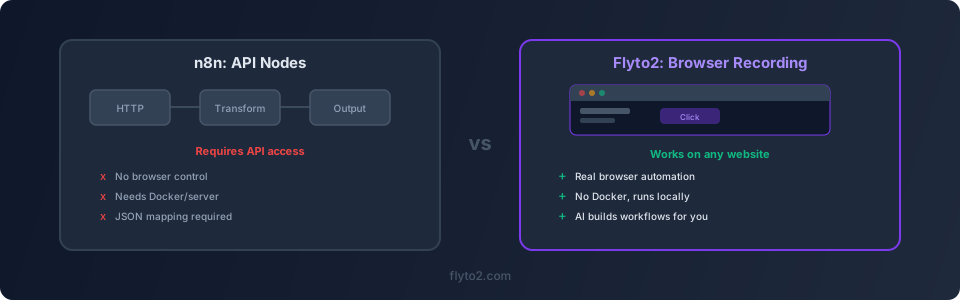
n8n vs Flyto2 — Comparison Table
Neither tool is universally better. They solve different problems. Here is an honest comparison:
| Feature | n8n | Flyto2 |
|---|---|---|
| Best for | Connecting SaaS apps via APIs | Automating browser-based tasks |
| Visual editor | Yes (node-based canvas) | YAML + AI agent |
| Browser automation | Limited (via HTTP requests) | Full browser engine (Playwright) |
| API integrations | 400+ built-in nodes | Via HTTP modules + browser |
| Self-hosting | Requires Docker or server | Cloud SaaS or enterprise self-hosted |
| AI assistance | AI code generation in nodes | AI agent builds entire workflows |
| Pricing | Free (self-hosted) or paid cloud | Free and open source |
| Learning curve | Moderate (JSON, data mapping) | Low (YAML or natural language) |
| Open source | Yes | Yes |
When to Choose n8n
n8n is the right choice when:
- Your tasks are API-based. If you are syncing data between Slack, Google Sheets, Salesforce, and other SaaS tools, n8n has excellent built-in integrations for that.
- You need webhooks and triggers. n8n handles incoming webhooks, cron schedules, and event-driven flows very well.
- You already have Docker infrastructure. If your team is comfortable with containers and you have a server running, n8n fits right in.
- You need complex data transformations. n8n's function nodes let you write JavaScript to transform data between steps, which is powerful for ETL-style workflows.
When to Choose Flyto2 as Your n8n Alternative
Flyto2 is the better fit when:
- The website has no API. If you need to interact with a web page the way a human does — clicking, typing, scrolling — Flyto2 handles that natively.
- You want zero infrastructure. No Docker, no server, no port forwarding. Use the cloud platform and start automating in minutes.
- Your team is non-technical. YAML is simpler than configuring n8n nodes, and the AI agent means you can describe tasks in plain English.
- You combine browser tasks with file operations. Download a file from a website, rename it, move it to a specific folder, and send an email notification — Flyto2 handles the entire chain.
Using Flyto2 and n8n Together
Here is something most "alternative" articles will not tell you: you do not have to choose just one. Many teams use both tools for different types of tasks.
Use n8n for your API-based workflows — syncing CRM data, processing webhooks, connecting cloud services. Use Flyto2 as your n8n alternative for everything that requires a browser — filling out forms on legacy portals, scraping data from websites without APIs, or automating desktop workflows.
The two tools complement each other well because they solve different layers of the automation problem.
Common Use Cases Where Flyto2 Shines as an n8n Alternative
Here are specific scenarios where teams switch to or add Flyto2:
- Government and banking portals. These rarely have APIs. Flyto2 automates form submissions, document uploads, and status checks through the browser.
- Competitor price monitoring. Visit competitor websites, extract prices, and save them to a spreadsheet. No API needed.
- Internal tool automation. Many companies have internal admin panels built 10 years ago with no API. Flyto2 automates them as-is.
- Report generation. Log into a dashboard, set date filters, export a PDF, and email it to the team — all automated.
- Account provisioning. When a new employee joins, create their accounts across multiple web portals that lack APIs.
Getting Started with Flyto2
If you are ready to try Flyto2 as your n8n alternative, getting started takes just a few minutes:
- Sign up for Flyto2 at flyto2.com
- Describe your task in plain English, or write a simple YAML workflow
- Run it — Flyto2 opens a browser, performs your steps, and shows results
For more advanced workflows, check the documentation or explore the module library on GitHub.
Try Flyto2
Ready to automate the tasks that n8n cannot reach? Flyto2 is free, open source, and ready to use with zero setup.
- Website: flyto2.com
- Documentation: docs.flyto2.com
- Source code: github.com/flytohub/flyto-core