
Learn how to connect flyto-core as an MCP server to Claude Desktop, Cursor, and other MCP-compatible clients.
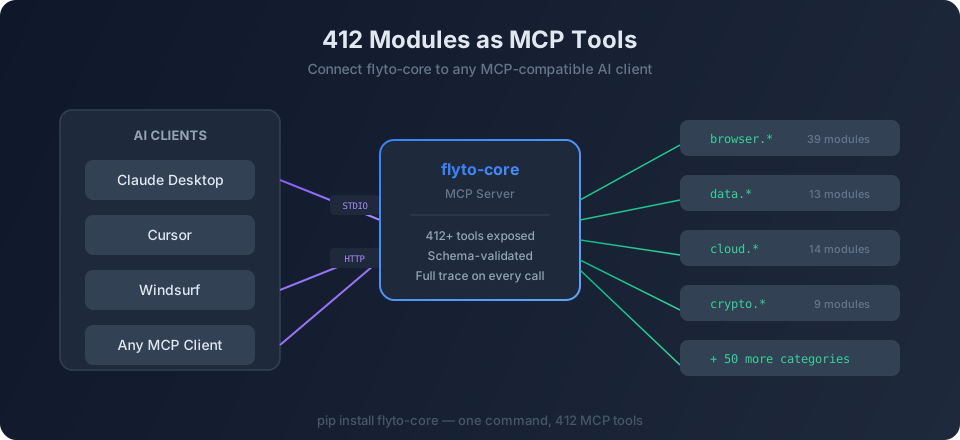
What is MCP?
The Model Context Protocol (MCP) is an open standard for connecting AI models to external tools and data sources. flyto-core implements MCP, exposing all 467+ modules as tools that any MCP client can use.
Setup with Claude Desktop
Add this to your Claude Desktop MCP configuration:
json
{
  "mcpServers": {
    "flyto-core": {
      "command": "python3",
      "args": ["-m", "flyto_core.mcp_server"]
    }
  }
}
Once connected, you can ask Claude to use any flyto-core module:
"Encrypt this message with AES-GCM using the key 'my-secret'"
Claude will call the crypto.encrypt module and return the result.
Available Transports
| Transport | Use Case |
|---|---|
| STDIO | Local desktop apps (Claude Desktop, Cursor) |
| Streamable HTTP | Remote servers, cloud deployments |
What Modules Are Available?
All 467+ modules become MCP tools, organized into 55 categories:
- Browser — Navigate, click, type, extract, screenshot
- Data — Parse JSON, CSV, XML, YAML
- Cloud — AWS S3, Azure Blob, Google Cloud Storage
- Crypto — AES encryption, JWT, HMAC
- And many more
Next Steps
- Browse the full module reference
- Read the MCP server documentation
- Try flyto-ai for natural language automation