
If you've ever tried to automate a simple task — like renaming files, filling out a form, or pulling data from a website — you've probably come across Microsoft Power Automate. It works, but it comes with strings attached: a Microsoft account, a cloud subscription, and a learning curve that can feel steep for basic tasks.
What if you just want a power automate alternative free of all that? Something you can install, run on your own computer, and use without signing into anything?
That's exactly what Flyto2 was built for.
Why People Look for a Power Automate Alternative
Power Automate is a solid tool for large organizations already deep in the Microsoft ecosystem. But for many people, it's overkill. Here are the most common frustrations:
- You need a Microsoft 365 account just to get started
- Many features are locked behind paid plans — the "free" tier is limited
- It runs in the cloud, which means your data leaves your computer
- Simple tasks require complex setup with connectors and flow designers
If any of that sounds familiar, you're not alone. A lot of people just want a straightforward way to automate repetitive work without jumping through hoops.
What Makes a Good Power Automate Alternative Free of Complexity?
When searching for a power automate alternative, most people want three things:
- Free to use — not a 14-day trial, actually free
- No Microsoft lock-in — no Microsoft 365 account required
- Easy to start — sign up and go, without reading 50 pages of docs first
Flyto2 checks all three boxes.
Install in One Command
You can get started with a single command in your terminal:
pip install flyto-coreThat's it. No credit card. No Microsoft account.
467+ Ready-to-Use Modules
Flyto2 comes with over 467 pre-built modules that cover the most common automation needs:
- Browser automation — open pages, click buttons, fill forms, take screenshots
- File operations — rename, move, copy, convert, and organize files in bulk
- Data processing — read spreadsheets, parse CSVs, transform JSON
- System tasks — run shell commands, manage processes, schedule jobs
Each module is a small, focused building block. You combine them to create workflows — step by step, in plain YAML.
A Simple Example
Say you want to download a report from a website every morning. Here's what that looks like:
steps:
  - module: browser.goto
    params:
      url: "https://example.com/reports"
  - module: browser.click
    params:
      selector: "#download-btn"
  - module: file.move
    params:
      source: "~/Downloads/report.csv"
      destination: "~/Reports/report-{{date}}.csv"
Three steps. No drag-and-drop designer. No connectors to configure. Just tell it what to do, and it does it.
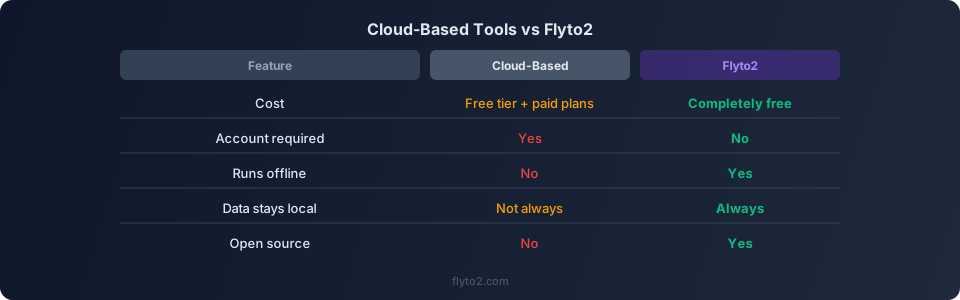
How Flyto2 Compares as a Power Automate Alternative
| Feature | Cloud-Based Tools | Flyto2 |
|---|---|---|
| Cost | Free tier + paid plans | Completely free |
| Account required | Microsoft 365 | Free sign-up |
| Enterprise self-hosted | No | Yes |
| Data control | Limited | Full (enterprise self-hosted available) |
| Pre-built modules | Varies | 467+ |
| Open source engine | No | Yes |
The biggest difference is flexibility. With Flyto2, you are not locked into the Microsoft ecosystem, and enterprise teams can deploy on their own infrastructure for full data control.
Who Is This For?
Flyto2 works well for:
- Freelancers who need to automate invoicing, file management, or client reports
- Small teams that don't want to pay per-user for automation tools
- Developers who prefer YAML and CLI over drag-and-drop interfaces
- Privacy-conscious users who want enterprise self-hosted deployment for full data control
- Students and hobbyists learning about automation without spending money
What About AI-Powered Workflows?
Flyto2 also supports AI-driven automation through flyto-ai. You can describe a task in plain English, and the AI agent builds and runs the workflow for you. No YAML needed.
For example, you could say: "Go to this website, find the pricing table, and save it as a spreadsheet." The agent figures out the steps and executes them.
This is entirely optional — you can use Flyto2 with or without AI.
Getting Started with Flyto2
If you're looking for a power automate alternative that's free and simple, here's how to start:
- Install it:
pip install flyto-core - Read the docs: docs.flyto2.com
- Explore the source: github.com/flytohub/flyto-core
You can also download the desktop app from flyto2.com if you prefer a visual interface.
Try Flyto2
Ready to automate without the overhead? Flyto2 is free and gives you full control over your workflows. Sign up and start building in minutes.