Enterprise automation platforms are built for large companies with dedicated IT teams, big budgets, and months to spare for setup. But what if you're a small team that just wants to get things done?
If you've looked into enterprise RPA (robotic process automation) tools, you know they can be powerful — but also expensive, complicated, and way more than a 5-person team actually needs. That's why more small teams are searching for an automation anywhere alternative that fits their size.
The Problem with Enterprise RPA for Small Teams
Enterprise automation platforms typically come with:
- Per-bot licensing that costs thousands of dollars per year
- Complex setup requiring dedicated servers, admin consoles, and training
- Features you'll never use like enterprise governance, compliance dashboards, and multi-tenant orchestration
- Long onboarding — weeks or months before you automate your first task
For a small team that just wants to stop copying data between spreadsheets or manually checking websites, this is like buying a freight train when you need a bicycle.
What Small Teams Actually Need
When a small team looks for an automation anywhere alternative, the requirements are usually straightforward:
- Free or very cheap — no per-user or per-bot fees
- Quick to set up — minutes, not weeks
- Easy to understand — anyone on the team can read and modify workflows
- Reliable — it should do the same thing every time, without surprises
Flyto2 was designed with exactly these needs in mind.
How Flyto2 Works as an Automation Anywhere Alternative
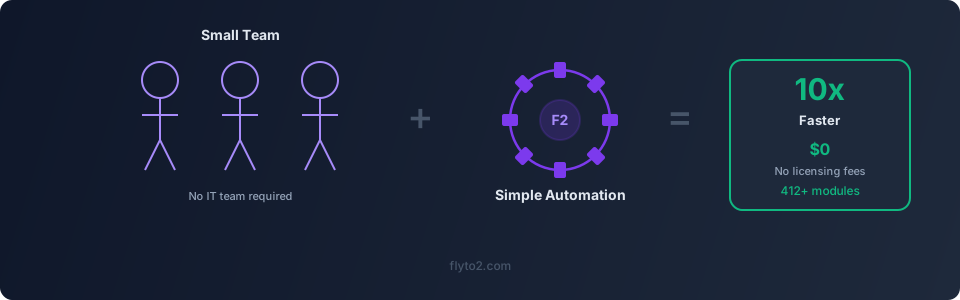
Flyto2 is an open-source workflow automation platform with 467+ pre-built modules. You write workflows in simple YAML, or let an AI agent build them for you.
Install in Seconds
pip install flyto-coreNo license key. No server setup. No sales call. It runs on your computer, right now.
Workflows Anyone Can Read
Here's a Flyto2 workflow that checks a website for price changes and sends a notification:
steps:
  - module: browser.goto
    params:
      url: "https://supplier.example.com/pricing"
  - module: browser.snapshot
    params:
      selector: ".price-table"
  - module: data.compare
    params:
      current: "{{snapshot.text}}"
      previous: "./last-prices.txt"
  - module: notify.send
    params:
      message: "Price changed!"
      when: "{{data.changed}}"
Even if you've never written code, you can look at this and understand what it does. That's the point — your whole team should be able to read, modify, and trust your automations.
467+ Modules, Zero Licensing
Every module is included for free:
- Browser automation — navigate, click, type, screenshot, extract data
- File handling — read, write, rename, convert between formats
- Data processing — parse JSON, CSV, XML; compare, filter, transform
- System operations — run commands, manage files, schedule tasks
- API calls — send HTTP requests, handle responses, chain API workflows
No "premium modules." No "enterprise tier." Everything is available from day one.
Real-World Use Cases for Small Teams
Here are some ways small teams use Flyto2 as their automation anywhere alternative:
Invoice Processing
A 3-person accounting team downloads invoices from vendor portals, extracts key data, and files them — all automatically. What used to take 2 hours every Friday now takes 5 minutes.
Lead Monitoring
A sales team of 4 monitors competitor pricing pages daily. Flyto2 checks the pages, compares prices to yesterday's snapshot, and flags changes. No one has to remember to check manually.
Report Generation
A small agency generates weekly client reports from multiple data sources. Flyto2 pulls the data, formats it, and saves the reports to the right folders — same format every time.
Data Entry
Instead of manually entering form data from spreadsheets, a team uses browser automation to fill out web forms row by row. A 200-row spreadsheet that took a full afternoon now finishes during a coffee break.
How Flyto2 Compares
| Feature | Enterprise RPA | Flyto2 |
|---|---|---|
| Cost | $10,000+/year | Free |
| Setup time | Weeks | Minutes |
| Modules included | Varies by license | 467+ (all free) |
| Requires IT team | Usually | No |
| Open source | No | Yes |
| Runs locally | Sometimes | Always |
| AI-assisted workflows | Add-on | Built in |
The Open Source Advantage
Because Flyto2's engine is open source, your team gets benefits that enterprise platforms can't match:
- No vendor lock-in — you own your workflows, always
- Full transparency — you can see exactly what every module does
- Community-driven — new modules and improvements come from real users
- Customizable — add your own modules if the built-in ones don't cover your case
Getting Started
Setting up Flyto2 for your small team takes about 5 minutes:
- Install:
pip install flyto-core - Browse modules: Check the documentation to see what's available
- Write your first workflow: Start with a simple task — file renaming, web scraping, or data conversion
- Share with your team: Workflows are plain YAML files — share them via Git, email, or any file sharing tool
Try Flyto2
If you're a small team looking for an automation anywhere alternative that doesn't come with enterprise baggage, give Flyto2 a try. It's free, it's simple, and it's built for teams like yours. Start automating today at flyto2.com.