
Manual data entry is one of the biggest time wasters in modern work. You have the information in one place and need it in another, but the only way to get it there is to type it in by hand. Data entry automation puts an end to that — letting your computer handle the copying while you do something more valuable.
The Real Cost of Manual Data Entry
Data entry seems like a small task, but the numbers tell a different story.
An average office worker spends 1 to 3 hours per day on data entry tasks. That includes copying information between systems, filling out web forms, updating records, and re-typing data that already exists somewhere else.
Beyond the time, manual data entry introduces errors. Studies show that humans make mistakes in roughly 1% of data entry keystrokes. When you are entering thousands of records, that means dozens of errors — each one potentially causing problems down the line.
Data entry automation solves both problems at once. It is faster than human typing and it does not make typos.
What Is Data Entry Automation?
Data entry automation means using software to enter data into forms, fields, and systems without manual typing. Instead of a person reading from one screen and typing into another, the software does it automatically.
This can look like:
- Form filling — Automatically entering information into web forms from a spreadsheet or database
- Cross-system transfers — Moving data from one application to another without copy-pasting
- Record creation — Adding new entries to a system based on incoming data
- Bulk updates — Changing information across many records at once
- Report submission — Filling out and submitting regular reports using pre-existing data
Who Needs Data Entry Automation?
If your job involves any of these tasks, data entry automation will save you time:
- Accountants entering invoices into bookkeeping software
- Sales reps logging customer details into a CRM after every call
- HR staff onboarding new employees across multiple platforms
- Healthcare workers transferring patient information between systems
- Logistics teams entering shipping details into carrier portals
- Anyone who copies data from emails or spreadsheets into web forms
How Data Entry Automation Works with Flyto2
Flyto2 automates data entry by combining browser automation with intelligent form detection. Here is the process:
1. Prepare Your Data
Start with your data in a structured format — a spreadsheet, CSV file, or even a list. This is the information you want entered into the target system.
For example, a CSV file with customer records:
Name, Email, Phone, Company
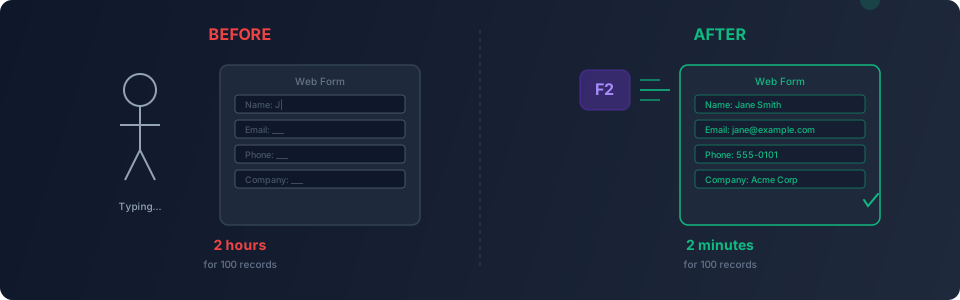
Jane Smith, jane@example.com, 555-0101, Acme Corp
Bob Wilson, bob@example.com, 555-0102, Widget Inc
2. Describe the Target
Tell Flyto2 where the data needs to go:
"Open our CRM at crm.example.com, go to 'Add Contact,' and for each row in my CSV file, fill in the name, email, phone, and company fields, then click Save."
3. Flyto2 Maps Fields Automatically
The platform opens the target website, identifies the form fields, and matches them to your data columns. It understands field labels, placeholder text, and form structure — so it puts the right data in the right field.
4. Watch It Enter Data
Flyto2 fills out the form, clicks submit, and moves to the next record. Each entry is logged with a screenshot so you can verify that everything was entered correctly.
For a hundred records, what would take a full day of typing is done in minutes.
Practical Examples of Data Entry Automation
Example 1: Invoice Processing
An accounting team receives invoices by email. Each invoice needs to be entered into their bookkeeping system — vendor name, invoice number, amount, date, line items.
With data entry automation, the workflow:
- Reads invoice data (from a spreadsheet or parsed email)
- Opens the bookkeeping system
- Creates a new invoice entry
- Fills in all the fields
- Saves and moves to the next invoice
The team processes a full day's invoices during their morning coffee.
Example 2: Employee Onboarding
When a new employee joins, HR needs to create accounts in five different systems — payroll, benefits, IT ticketing, project management, and the company directory. Each system has its own web form.
Data entry automation fills out all five forms using the same employee information. What used to take an hour per new hire now takes five minutes.
Example 3: Inventory Updates
A retailer manages inventory on their own website and two marketplace platforms. When stock levels change, they need to update all three systems.
An automated workflow takes the updated inventory data and enters it into each platform, ensuring all three systems show the same numbers.
Why Data Entry Automation Beats Other Approaches
Compared to Copy-Paste
Copy-paste is the most common "automation" people use. But it is still manual — you have to select the text, switch windows, find the right field, and paste. With hundreds of entries, it is barely faster than typing.
Data entry automation requires no manual interaction. Set it up once and let it run.
Compared to API Integrations
APIs are the ideal way to connect systems, but not every platform offers an API. Many business tools — especially older ones — only have web interfaces. Data entry automation works with any website, no API needed.
Compared to Hiring Help
Outsourcing data entry to virtual assistants is common, but it introduces security concerns (sharing login credentials), quality issues (error rates), and ongoing costs. Automation is faster, more accurate, and does not need access to sensitive credentials on external machines.
Tips for Successful Data Entry Automation
- Clean your data first — Remove duplicates, fix formatting, and fill in missing fields before running the automation
- Start with a small batch — Test with 5 to 10 records before processing hundreds
- Check the results — Review the screenshots Flyto2 captures to verify data was entered correctly
- Handle exceptions — Some records might fail (duplicate entries, validation errors). Flyto2 logs these so you can address them manually
- Keep your source data organized — Consistent column names and formats make the mapping more reliable
Try Flyto2
Manual data entry is a problem that should not exist in 2026. Data entry automation with Flyto2 gives you back the hours you have been wasting on repetitive typing.
- Visit flyto2.com to get started
- Read the documentation for step-by-step guides
- Explore the open-source engine on GitHub