
You have 300 invoices to rename. Or 150 product listings to update. Or 500 rows of data to enter into a web form. Doing it one by one would take all day. Batch automation lets you do it all at once.
This guide explains what batch automation is, when to use it, and how to set it up — even if you've never automated anything before.
What Is Batch Automation?
Batch automation means running the same task across many items automatically, instead of handling each one by hand. Think of it like this:
- Manual work: Open file, rename it, move it to folder. Repeat 300 times.
- Batch automation: Tell the computer the pattern, press run, and all 300 files get renamed and moved.
The key idea is simple — if you're doing the same thing over and over, a computer should do it for you.
When Should You Use Batch Automation?
Batch automation makes sense whenever you have:
- Repetitive tasks — the same steps, applied to many items
- Predictable patterns — each item follows the same structure
- High volume — doing it manually would take more than 30 minutes
Here are some everyday examples:
File Management
- Rename 500 photos from "IMG_0001.jpg" to "vacation-paris-001.jpg"
- Convert 200 Word documents to PDF
- Sort files into folders based on date or type
Data Processing
- Clean up a spreadsheet with 1,000 rows of messy addresses
- Merge data from 50 CSV files into one
- Extract specific fields from hundreds of JSON files
Web Tasks
- Fill out the same web form with data from a spreadsheet — row by row, automatically
- Download files from 100 different URLs
- Check 200 product pages for price changes
Notifications
- Send personalized messages to a list of contacts
- Generate reports for each client from a template
- Create calendar events from a task list
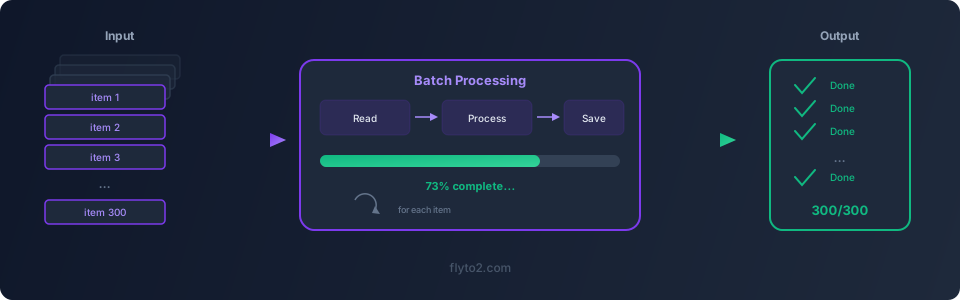
How Batch Automation Works in Flyto2
Flyto2 makes batch automation straightforward. You define your task once, point it at your data, and let it run through every item.
Example 1: Rename Files in Bulk
Say you have a folder full of files named like report_Q1_2026_draft_v3_FINAL.xlsx and you want clean names like 2026-Q1-report.xlsx.
steps:
  - module: file.list
    params:
      path: "./messy-reports/"
      pattern: "*.xlsx"
  - module: file.rename
    params:
      source: "{{item.path}}"
      destination: "./clean-reports/{{item.date}}-{{item.quarter}}-report.xlsx"
Run once, and every file in the folder gets renamed. No clicking, no typos.
Example 2: Fill Out Web Forms from a Spreadsheet
You have a CSV with 200 customer records that need to be entered into a web portal:
steps:
  - module: data.read_csv
    params:
      path: "./customers.csv"
  - module: browser.goto
    params:
      url: "https://portal.example.com/new-customer"
  - module: browser.type
    params:
      selector: "#name"
      text: "{{row.name}}"
  - module: browser.type
    params:
      selector: "#email"
      text: "{{row.email}}"
  - module: browser.click
    params:
      selector: "#submit"
The workflow reads each row from the spreadsheet and fills out the form automatically. Two hundred entries, zero manual typing.
Example 3: Download Files from a List of URLs
You have a text file with 100 URLs pointing to PDF documents:
steps:
  - module: data.read_lines
    params:
      path: "./urls.txt"
  - module: http.download
    params:
      url: "{{line}}"
      destination: "./downloads/{{line.filename}}"
All 100 files download automatically. Go get coffee.
Tips for Effective Batch Automation
Start Small
Don't batch-automate 10,000 items on your first try. Start with 5 or 10. Make sure the workflow works correctly, then scale up.
Add Error Handling
Some items might fail — a file might be locked, a URL might be broken, a form field might be missing. Good batch automation handles errors gracefully instead of stopping everything.
Flyto2 workflows support error handling so one bad item doesn't ruin the whole batch.
Keep a Log
When processing hundreds of items, you want to know what succeeded and what didn't. Flyto2 provides an audit trail for every step, so you can review exactly what happened.
Schedule Regular Batches
If you do the same batch job weekly — like processing invoices or generating reports — schedule it. Run it automatically every Monday morning instead of remembering to do it manually.
Why Flyto2 for Batch Automation?
Flyto2 is especially well-suited for batch automation because:
- 467+ modules cover files, web browsers, data processing, APIs, and more
- Deterministic execution — same inputs always produce the same outputs
- Full audit trail — every step is recorded with evidence
- Runs locally — your data stays on your machine
- Free and open source — no per-run fees, no usage limits
You can install it in one command:
pip install flyto-coreOr download the desktop app from flyto2.com.
Try Flyto2
Ready to stop doing things one by one? Flyto2 makes batch automation simple — define your task once, run it across hundreds of items, and get your time back. Check out the documentation to get started, or explore the engine on GitHub.